


OBDAI: OBD2 AI Car Scanner
4.37.00 Reviews
App Specs
- Version
- 2.0.7
- Updated On
- License
- Free
- Downloads
- 10,000+
- Developer
- Ontario Analytics
- Categories
- Auto & Vehicles
- Platform
- Android
Screenshots
 Analysis by AppCompare
I judge a car app less by the first impressive screen than by whether it still helps after the first warning light has been dealt with. OBDAI: OBD2 AI Car Scanner has an appealing first-week hook: it turns an OBD2 reader into a more approachable way to look at vehicle information, understand diagnostic codes, and follow live readings. Its longer-term value depends on how often you need that help, whether you already own a compatible scanner, and how comfortable you are treating an app’s guidance as a starting point rather than a repair verdict.
A useful first week, if you have the right setup
The key practical question comes before installation: do you have an OBD2 scanner to connect to the app? The reader is a separate piece of hardware that plugs into the car’s OBD port, so the app by itself is not a complete diagnostic setup. If you already own a compatible reader, getting started can make sense; if you do not, factor in finding and buying one before expecting to see vehicle data. The app is free to download, but that does not mean the whole setup is cost-free.
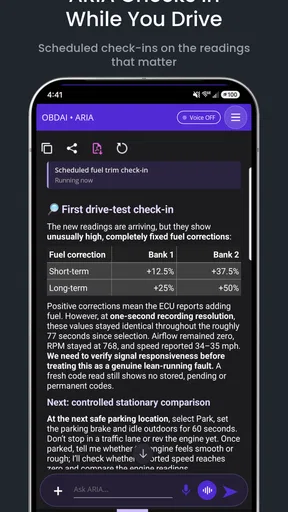
Once connected, the combination of diagnostic reports and plain-language explanations is more inviting than staring at a code and trying to decode it through scattered search results. That is especially helpful for a driver who wants to arrive at a repair shop with a clearer description of the problem. I would still treat the explanation as orientation, not a diagnosis from a technician: a code can point toward an area to investigate without proving which part has failed.
Where the month-to-month value comes from
For occasional drivers, the lasting benefit is less about watching a dashboard all day and more about having a way to check what is happening when something changes. A warning light appears before a planned trip, for example, and you can use a reader and the app to gather information before deciding whether to continue, arrange service, or ask a mechanic. That can make a conversation more focused, but it cannot establish that a car is safe to drive. If the vehicle behaves dangerously or a warning calls for immediate attention, get qualified help rather than relying on an app.
Live readings may matter more to someone who enjoys learning how a car behaves over time. A useful habit is to look at a small set of relevant values under similar conditions instead of watching every figure at once. For instance, comparing readings during a repeatable drive can be more meaningful than reacting to a number seen during a different route or driving situation. Keep your attention on driving first; any checks that require looking at the phone belong while parked or with a passenger handling the screen.
OBDAI is an app in the Auto & Vehicles category from Ontario Analytics. It is free to install, has an average rating of 4.3 from 49 ratings, and has passed 10K+ installs. The Everyone age rating makes its intended audience broad, while optional in-app purchases range from $9.99 to $99.99 per item. I would check the purchase details in the app before committing: the free download is a low-friction way to explore, but paid items may affect how useful it feels for your own routine.
Keep the guidance in its proper lane
The assistant’s main appeal is reducing the effort between seeing a code and understanding what to ask next. That can help a first-time owner avoid treating unfamiliar terminology as a repair plan. A sensible workflow is to record the code and the circumstances in which it appeared, read the explanation, then confirm the next step with a repair professional when the issue is persistent, safety-related, or beyond your skills. Clearing a warning without fixing its cause would defeat the point of checking it.
Worth Reading Before You Choose

Baby Panda World Brings Quick Play to Modern Phones, but Its Game Library Feels Busy

ESPN’s Live Game View Makes Following Close Games Easier

QuizzLand Review: A Good Fit for Short Trivia Breaks, Not Every Player

Basketball Stars: Multiplayer Is Fast, but Can It Recover When Matches Go Wrong?

WEBTOON Turns Phone Updates Into a Better Reading Routine

Link to Windows Runs on Shared Habits, Not Social Feeds
It is also worth separating a helpful report from a complete inspection. An OBD2 tool can tell you about information available through the vehicle’s diagnostic system; it cannot replace checking tires, brakes, fluid condition, unusual sounds, or other physical symptoms. If the app suggests a likely area but the car’s behavior does not fit, give the mechanic both pieces of information instead of forcing the symptoms to match the code.
The maintenance habit—and its limits
Reminders can support routine upkeep, but they are only useful if the schedule reflects your car and how you use it. I would verify service intervals against the owner’s manual and keep a separate record of work completed, especially if more than one person maintains the vehicle. A notification is a prompt to check, not proof that a service is due or that it has been done. This small bit of housekeeping helps prevent a digital reminder from becoming another alert you dismiss automatically.
The same principle applies to keeping the app installed. If you drive regularly, handle more than one vehicle, or like checking a concern before booking service, diagnostics and reminders may earn a place in your routine. If you only want an occasional code lookup, a basic reader paired with a straightforward code reference—or simply a mechanic’s scan—may be simpler. The right choice depends on whether the extra interpretation and live view actually change what you do.
At the time of writing, the app is on version 2.0.7 and requires Android 6.0 or later. Those details make it easier to check whether an older phone can run it, but the scanner itself also needs to work with your vehicle and connection setup. Before buying hardware, confirm that it suits your car and intended use; a mismatch can turn an appealing app into an unhelpful purchase.
My biggest reservation is the risk of overconfidence. AI-generated explanations can make a complicated problem feel settled when the underlying evidence is only a code or a set of readings. Use the report to prepare better questions, not to authorize an expensive repair or ignore a serious symptom. The app is most valuable when it makes you more informed while leaving safety-critical judgment to a qualified person.
If the first warning light is the only reason you install it, the novelty may fade quickly. If you can name a recurring reason to check your car—understanding a persistent fault, keeping an eye on selected live values, or staying organized around maintenance—the case for keeping it becomes stronger. I would try the free app with compatible hardware, learn what its reports can and cannot tell you, and decide after a few real checks whether the paid options add enough to your own routine.
First Impressions
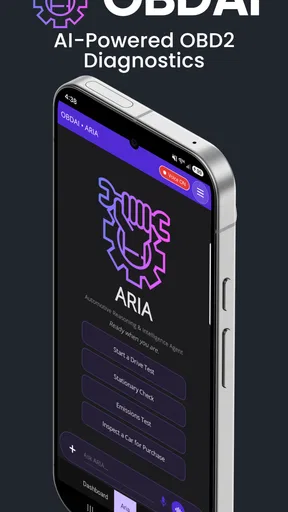
When I first downloaded OBDAI: OBD2 AI Car Scanner, I was impressed by its sleek and user-friendly interface. It’s clear the developers put a lot of thought into making the app intuitive for users of all tech levels. Setting it up was a breeze. You just need an OBD2 scanner, which is that little device you plug into your car’s OBD port. The app pairs with it seamlessly via Bluetooth, which is a huge plus for those of us who dread complicated setups.
Features Galore
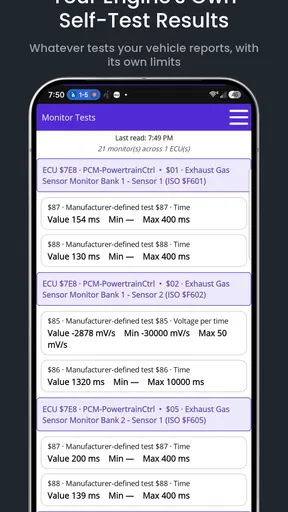
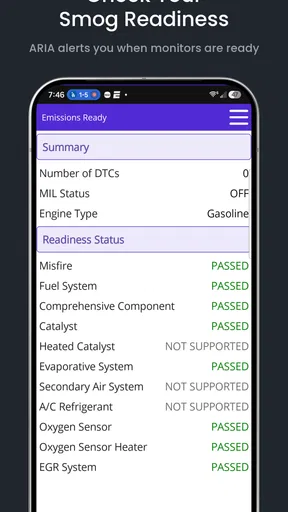
Now, let’s dive into what this app can actually do. The standout feature is its AI-driven diagnostics. Once connected, it runs a comprehensive check on your vehicle’s health, scanning for issues that might not even trigger the dreaded check engine light. I was amazed at how detailed the reports were. The app provided insights into various systems like the engine, transmission, and even the fuel system.
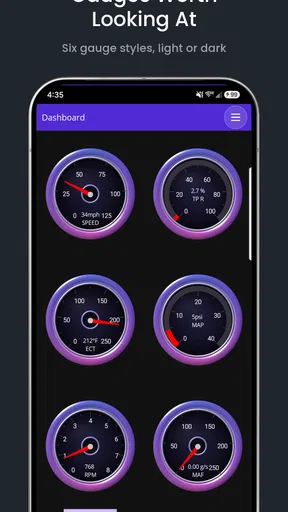
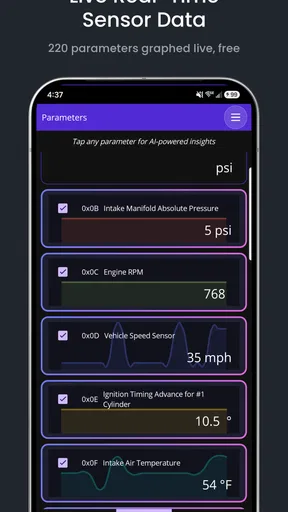
One feature I particularly liked was the real-time monitoring. As someone who likes to keep tabs on my car’s performance, being able to see live data like RPM, speed, and fuel consumption was fantastic. It’s like having a personal mechanic riding shotgun, keeping you informed every step of the way.
User Experience
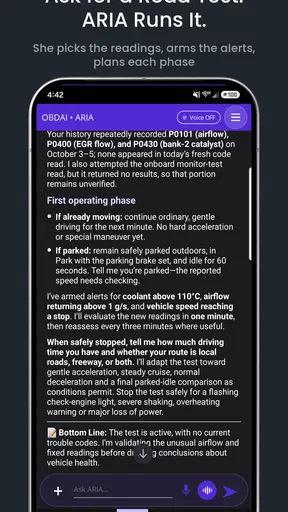
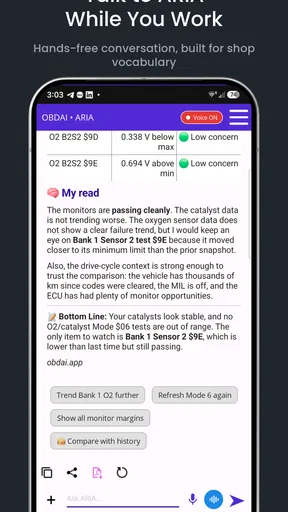
The app’s AI Assistant is another noteworthy aspect. It’s like having a friendly expert in your pocket, explaining what each diagnostic code means. No more googling obscure codes and trying to make sense of them. The assistant gives you actionable advice on how to address each issue, whether it’s something you can fix yourself or if it’s time to call in the pros.
Another nice touch is the app’s maintenance reminders. It tracks your service schedules and sends notifications when it's time for an oil change or tire rotation. This feature is a lifesaver for those of us juggling a million things and forgetting about car upkeep until it’s too late.
Performance and Reliability
In terms of performance, the app runs smoothly without any noticeable lag, which is crucial when you’re dealing with real-time data. I tested it on different vehicles and found it to be consistently reliable. The connection between the app and the OBD2 device remained stable, and the data was always up-to-date.
Security is also a big concern when dealing with car data, and the app doesn’t disappoint. It encrypts all data transmissions, ensuring your vehicle’s information stays private. It’s reassuring to know that your car’s diagnostics aren’t being shared with third parties.
Wrapping Up
After spending some quality time with OBDAI: OBD2 AI Car Scanner, I can confidently say it’s a game-changer for car maintenance. It combines the power of AI with an intuitive interface, making it a must-have for anyone looking to keep their car in tip-top shape. Whether you’re a car enthusiast or just someone who wants to avoid unexpected breakdowns, this app is worth checking out.
So, if you’re ready to take control of your car’s health, give this app a download. It’s like having a trusty co-pilot, ensuring your car runs smoothly and efficiently.
Pros
- User-friendly interface for easy navigation.
- Real-time diagnostics with AI insights.
- Supports a wide range of car models.
- Customizable alerts for maintenance.
- Offline mode available for data access.
Cons
- Requires external OBD2 device.
- Limited free version features.
- Occasional connectivity issues.
- Subscription model for premium features.
- Data-heavy
- may affect battery life.
FAQs for OBDAI: OBD2 AI Car Scanner
What features does OBDAI: OBD2 AI Car Scanner offer?
OBDAI: OBD2 AI Car Scanner provides real-time diagnostics of your vehicle's performance. It offers features such as error code detection, fuel efficiency monitoring, and AI-driven insights to help improve your car's health. It also includes a user-friendly interface and detailed reports, making it accessible for both novice and experienced users.
Is OBDAI compatible with all vehicles?
OBDAI is compatible with most vehicles manufactured after 1996 that support the OBD2 standard. However, compatibility may vary depending on the vehicle's make, model, and year. It is advisable to check the app's compatibility list or consult your vehicle's manual to ensure seamless integration.
Does OBDAI require any additional hardware?
Yes, OBDAI requires an OBD2 adapter to connect your smartphone to your vehicle. The adapter plugs into the OBD2 port in your car and communicates with the app via Bluetooth or Wi-Fi. Ensure you have a compatible adapter for optimal performance and functionality.
How does OBDAI use AI to improve vehicle diagnostics?
OBDAI employs AI algorithms to analyze data collected from your vehicle in real-time. This technology helps identify patterns and potential issues that might not be immediately apparent. The AI insights can provide tailored maintenance advice and predict future problems, helping you maintain your vehicle efficiently.
Is my data safe when using OBDAI?
OBDAI prioritizes user privacy and data security. The app uses encrypted connections to transfer data between your device and the OBD2 adapter. User data is stored securely and is not shared with third parties without consent, ensuring your vehicle information remains confidential.


